What Are Office Workstations?
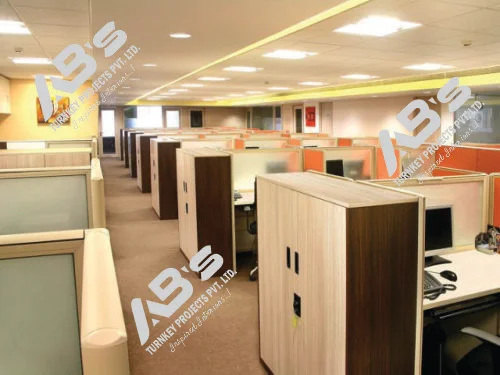
Office workstations are dedicated working spaces designed to give employees an organized and comfortable area for daily tasks. They commonly include a desk, storage, partitions, cable management, and seating arrangements. A suitable workstation can improve space utilization while giving the office a clean and professional appearance.
For businesses planning a new office or renovating an existing workplace, choosing the right office workstation manufacturers in Pune can make a major difference in functionality, employee comfort, appearance, and use of available floor space.
AB’s Turnkey Projects Private Limited provides office furniture and interior solutions designed around practical workplace requirements in Pune.
Why Choose Office Workstation Manufacturers in Pune?
Pune has a growing commercial environment with offices ranging from startups and small businesses to large corporate workplaces. This has increased the need for practical, attractive, and space efficient office furniture.
Working with experienced office workstation manufacturers in Pune offers several advantages.
Better Space Utilization
A professionally planned workstation can use available floor space more effectively. Instead of placing individual desks randomly, workstations can be arranged according to the office dimensions, departments, walkways, and employee requirements.
Customization Options
Every workplace has different needs. Some offices require compact desks, while others need larger team based layouts. Manufacturers can provide different sizes, finishes, storage options, partitions, and seating configurations.
Consistent Office Design
A planned workstation system can create a consistent appearance across the workplace. Matching desks, finishes, partitions, and storage units can give the office a neat and professional look.
Better Cable Management
Computers, monitors, chargers, and networking equipment create many cables. Workstations with cable management features can keep wires organized and reduce visual clutter.
Easy Expansion
Modular workstations can be modified as a business grows. Additional units can often be added, while existing layouts can be rearranged according to changing employee requirements.
Types of Office Workstations
Single Seater Workstation
A single seater workstation is designed for one employee. It is suitable for small offices, individual work areas, and compact departments. It can include a desk, partition, storage, and cable management.
Linear Workstation
A linear workstation follows a straight arrangement and can accommodate multiple employees in a row. It is useful when an office needs several workstations in an organized layout.
Back to Back Workstation
In a back to back configuration, employees sit on opposite sides of a shared workstation structure. This arrangement can make efficient use of floor space and is suitable for teams requiring multiple workstations.
Cluster Workstation
Cluster workstations group several employees together in a structured arrangement. They can support communication between team members while reducing unused space.
L Shaped Workstation
An L shaped workstation provides additional working surface compared with a standard straight desk. It can be useful for employees who need space for computers, documents, equipment, or multiple work materials.
Executive Workstation
Executive workstations are generally larger and provide additional working and storage space. They can be suitable for managers, senior professionals, and private office areas.
Benefits of Modular Office Workstations
Modular furniture is popular because businesses need workplaces that can adapt to changing requirements.
Flexible Layout
Modular workstations support different arrangements based on team size, floor area, and work requirements.
Efficient Use of Space
A properly planned modular workstation can provide individual working areas without occupying unnecessary floor space.
Professional Appearance
Clean lines, matching finishes, organized storage, and suitable partitions can improve the overall office appearance.
Employee Comfort
Employees spend many hours at their workstations. Adequate desk space, legroom, seating space, and practical positioning of equipment can contribute to a more comfortable workplace.
Easy Modification
Modular systems can be rearranged when departments change, teams grow, or office requirements develop.
Better Organization
Integrated storage, cable management, and designated working areas can reduce clutter and make daily work more organized.
Modular Office Furniture Manufacturers in Pune With Price Guide
When searching for Modular office furniture manufacturers in pune with price list, it is important to understand that workstation pricing varies according to configuration, material, size, seating capacity, and customization.
Pune market listings indicate that basic modular workstation options may start around ₹4,800 to ₹5,500 per unit in some listings. Other configurations may range around ₹6,000 to ₹10,500 or more. Larger, customized, premium, or specialized workstation systems can cost considerably more.
A single workstation generally requires less material than a four seater or larger cluster configuration. Additional storage, partitions, premium finishes, customized dimensions, and specialized materials can further increase the final cost.
Businesses should therefore avoid selecting a manufacturer only because of the lowest starting price. Request a detailed quotation based on the number of workstations, seating capacity, dimensions, material and thickness, partitions, storage, cable management, finish, installation, delivery, and customization requirements.
Factors That Affect Workstation Prices
Several factors influence the final price of an office workstation.
Material
Workstations can use engineered wood, plywood, metal, aluminium, glass, or combinations of materials.
Size
Larger workstations require more materials and generally cost more than compact models.
Seating Capacity
A workstation for four or six employees requires more materials and components than a single seater workstation.
Storage
Pedestals, drawers, cabinets, shelves, and overhead storage can increase the overall investment.
Partitions
Partitions can provide visual separation, privacy, and design value. Their material and size can affect the cost.
Finish
Laminate, textured surfaces, premium finishes, colours, and customized designs can influence the final price.
Customization
Custom dimensions and special layouts require additional design and manufacturing work, so they may cost more than standard products.
Installation
Transportation, assembly, installation, and specific site requirements can also affect the total project cost.
How to Choose the Right Office Workstation
Choosing a workstation should begin with understanding how the office will be used.
Understand Employee Requirements
Consider the type of work employees perform. A design team may need larger desk surfaces, while an administrative team may need additional storage.
Measure the Office Space
Take accurate measurements before selecting furniture. Consider doors, windows, columns, electrical points, walkways, and emergency access.
Select the Right Configuration
Choose linear, back to back, cluster, L shaped, or customized configurations according to the available space and work requirements.
Consider Storage
Decide whether employees need personal drawers, pedestals, cabinets, shelves, or shared storage.
Check Cable Management
Modern workstations should provide practical ways to manage computer, electrical, and networking cables.
Think About Future Growth
If the company expects to add employees, choose a system that can be expanded or rearranged easily.
Check Quality
Check the quality of frames, panels, edges, hardware, surface finish, joints, and overall construction instead of judging furniture only by appearance.
Materials Used in Office Workstations
Material selection is an important part of workstation planning.
Engineered Wood
Engineered wood is commonly used because it provides a clean appearance and is available in different finishes.
Plywood
Plywood can offer strength and durability and may suit workplaces requiring robust furniture.
Metal
Metal frames can provide structural strength and support modern office designs.
Aluminium
Aluminium can be used for workstation frames and modular systems where a lightweight contemporary structure is preferred.
Glass
Glass can be used for selected partitions and design elements when businesses want a more open visual environment.
Workstation Layouts for Different Offices
Small Office
Compact linear or back to back workstations can help accommodate employees while maintaining movement space.
Open Office
Open offices often use linear or cluster systems that support teamwork while maintaining individual working areas.
Corporate Office
Corporate workplaces may combine employee workstations with manager areas, cabins, meeting rooms, collaborative spaces, and storage zones.
Creative Workspace
Creative teams may need larger work surfaces and flexible arrangements for laptops, documents, samples, and equipment.
Hybrid Workplace
Hybrid offices may require flexible workstations that can support different employees using the same workspace at different times.
Tips for Planning an Office Workstation
Before finalizing furniture, prepare a basic workplace plan. Calculate the number of employees and available floor area, then identify departments and teams that need to work together.
Plan walking paths carefully so employees can move comfortably between desks, meeting rooms, storage areas, and common spaces.
Keep electrical and networking points in mind during the design process. Natural light should also be considered, and large furniture should not unnecessarily block windows.
Common Mistakes to Avoid
Choosing Only by Price
The cheapest workstation may not provide the best long term value. Quality, durability, functionality, and service should also be considered.
Ignoring Measurements
Incorrect measurements can lead to furniture that does not fit properly within the office.
Overcrowding the Office
Adding too many workstations can make an office uncomfortable and reduce movement space.
Ignoring Storage
Insufficient storage can quickly create clutter on work desks and common areas.
Poor Cable Management
Unorganized cables can affect office appearance and create unnecessary safety concerns.
Ignoring Employee Comfort
Desk height, seating space, legroom, monitor placement, and overall layout should be considered.
Maintenance Tips
Regular maintenance can help extend the life of office furniture.
Clean workstation surfaces regularly using suitable cleaning materials and avoid excessive moisture on wooden surfaces.
Check screws, joints, handles, and other hardware periodically. Keep cable management systems organized and avoid unnecessary pressure on cables.
Do not overload drawers or storage units. For partitions and glass elements, use suitable cleaning methods to prevent scratches and surface damage.
If workstation components become damaged, repair them early instead of allowing small issues to become larger problems.
Frequently Asked Questions
1. How much do office workstations cost in Pune?
Prices vary according to size, material, seating capacity, storage, finish, and customization. Basic options can start at a few thousand rupees, while customized systems can cost significantly more.
2. Which workstation is best for a small office?
Compact single seater, linear, or back to back workstations are generally suitable because they can use floor space efficiently.
3. Are modular office workstations customizable?
Yes. Many modular workstation systems can be customized according to dimensions, seating, storage, partitions, materials, finishes, and office layout requirements.
4. What should I check before buying office workstations?
Check material quality, dimensions, durability, storage, cable management, finish, customization options, installation, and after sales support.
5. Can modular workstations be expanded later?
Yes. A key advantage of modular systems is that layouts can often be modified or expanded when office requirements change.
Final Words
Choosing the right office workstation manufacturers in Pune is an important step in creating a productive, comfortable, and professional workplace. The right workstation should balance design, functionality, durability, employee comfort, space utilization, and budget.
AB’s Turnkey Projects Private Limited provides practical office furniture and interior solutions in Pune that can support modern workplace requirements. From modular workstations and desks to storage, partitions, ceilings, and other office solutions, proper planning can help businesses create an efficient and visually appealing workplace.
When comparing Modular office furniture manufacturers in pune with price list, always look beyond the starting price. Understand the material, dimensions, configuration, customization, installation, and overall project requirements before making a final decision.
A well planned workstation is more than an office desk. It is an important part of the workplace environment and can contribute to better organization, efficient space usage, and a more comfortable working experience.